Mods & Plugins Management
Automatically download and manage mods and plugins for your Minecraft servers.
Overview
Minepanel integrates with popular mod platforms to auto-download mods, plugins, and datapacks at server startup.
| Platform | Best For | API Key Required |
|---|---|---|
| Modrinth | Mods, datapacks, plugins | ❌ No |
| CurseForge | Modpacks, mods | ✅ Yes |
| Spiget | Spigot/Paper plugins | ❌ No |
Learn More
For advanced options and all environment variables, see the docker-minecraft-server mods documentation.
Modrinth
Automatically download and manage mods, plugins, and datapacks from Modrinth.
Supported Server Types
- ✅ Fabric
- ✅ Forge
- ✅ CurseForge (AUTO_CURSEFORGE)
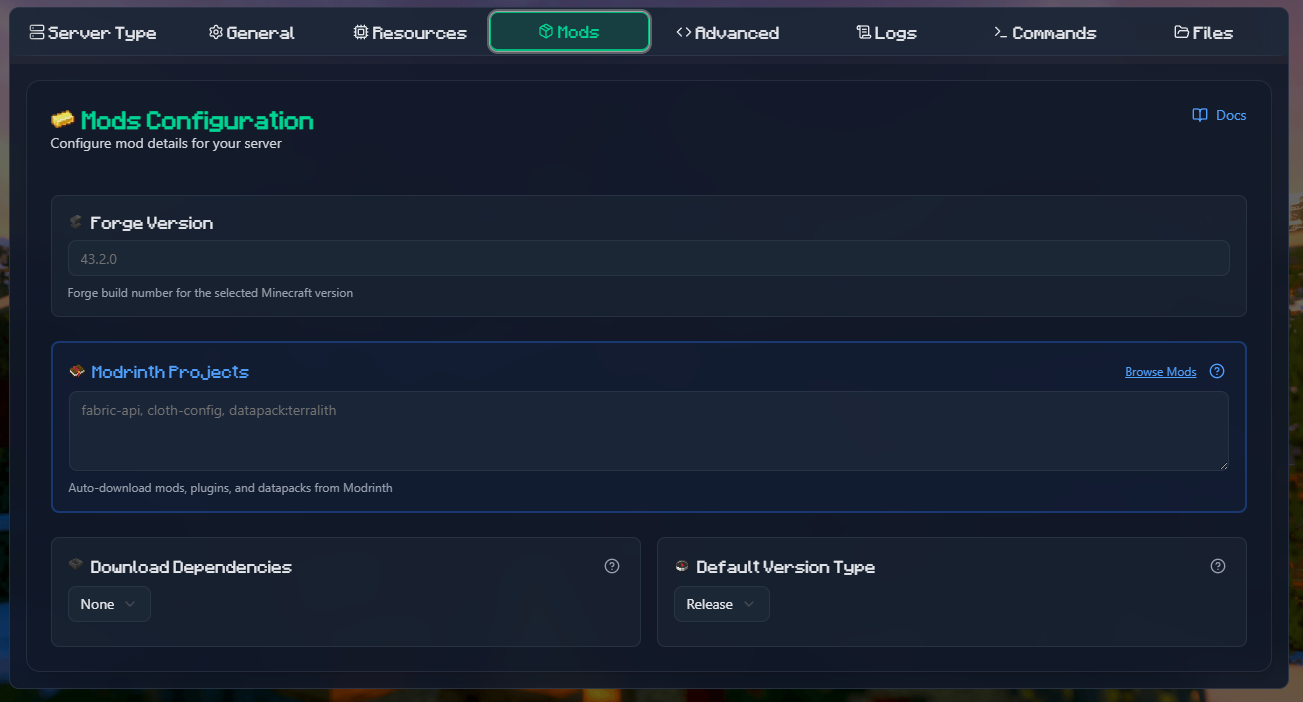
How to Add Mods from Minepanel
- Go to Create Server or Edit Server
- Open the Mods tab
- Find the Modrinth Projects field (blue border)
- Enter project slugs separated by commas or new lines
- Configure dependencies and version type if needed
- Save the server
Example input:
fabric-api
sodium
lithium
cloth-configDatapacks from Modrinth
Modrinth also hosts datapacks. To install them, use the datapack: prefix:
In Minepanel (Modrinth Projects field):
fabric-api
sodium
datapack:terralith
datapack:incendium
datapack:nullscape:1.2.4Syntax:
| Format | Example | Description |
|---|---|---|
datapack:slug | datapack:terralith | Latest version |
datapack:slug:version | datapack:terralith:2.5.5 | Specific version |
datapack:slug:beta | datapack:terralith:beta | Latest beta |
Vanilla Servers
For vanilla servers, the datapack: prefix is optional. The system auto-detects datapacks.
WARNING
Datapacks require a compatible Minecraft version. Check the datapack page on Modrinth for compatibility.
Project Reference Formats
The Modrinth Projects field accepts multiple formats:
| Format | Example | Description |
|---|---|---|
| Slug | fabric-api | Latest release |
| Slug + version | fabric-api:0.119.2+1.21.4 | Specific version |
| Slug + version ID | fabric-api:bQZpGIz0 | By version ID |
| Slug + release type | fabric-api:beta | Latest beta/alpha |
| Project ID | P7dR8mSH | Using Modrinth ID |
| Loader override | fabric:fabric-api | Force loader type |
| Datapack | datapack:terralith | Install datapack |
Configuration Options
| Field | Description | Default |
|---|---|---|
| Modrinth Projects | List of mods/plugins/datapacks | - |
| Dependencies | none, required, or optional | none |
| Version Type | release, beta, or alpha | release |
Auto-Removal
Mods removed from the list will be automatically deleted on next server start.
Docker Compose Reference
If you prefer to configure via docker-compose directly:
environment:
  TYPE: FABRIC
  VERSION: 1.21.4
  MODRINTH_PROJECTS: |
    fabric-api
    sodium
    datapack:terralith
  MODRINTH_DOWNLOAD_DEPENDENCIES: required
MODRINTH_PROJECTS_DEFAULT_VERSION_TYPE: releaseMore docker-compose examples
Forge server with specific versions:
environment:
  TYPE: FORGE
  VERSION: 1.20.1
  MODRINTH_PROJECTS: |
    jei:10.2.1.1005
    geckolib
createUsing a listing file:
Create /path/to/mods.txt:
# Performance mods
fabric-api
sodium
lithium

# Datapacks
datapack:terralith
datapack:incendiumThen mount and reference:
volumes:
  - ./mods-list:/extras:ro
environment:
MODRINTH_PROJECTS: "@/extras/mods.txt"CurseForge Modpacks
Install complete modpacks from CurseForge using the AUTO_CURSEFORGE server type.
API Key Required
You need a CurseForge API key. Get one from CurseForge for Studios.
Installation Methods in Minepanel
When creating/editing a server with type AUTO_CURSEFORGE, you can choose between 3 methods:
| Method | Auto-updates? | Use case |
|---|---|---|
| URL | ✅ Yes | Always get the latest compatible version |
| Slug | ❌ No | Lock to a specific file version |
| File | ❌ No | Use a local modpack zip file |
Method: URL (Recommended for auto-updates)
- Select URL as installation method
- Paste the modpack page URL from CurseForge
- On each server start, it downloads the latest compatible version
Example URL:
https://www.curseforge.com/minecraft/modpacks/all-the-mods-9TIP
Use URL method if you want automatic updates when the modpack releases new versions.
Method: Slug (Lock specific version)
- Select Slug as installation method
- Enter the modpack slug (e.g.,
all-the-mods-9) - Enter the File ID for the specific version you want
How to find the File ID:
- Go to the modpack page on CurseForge
- Click on "Files" tab
- Click on the version you want
- The File ID is in the URL:
.../files/5765432→ File ID is5765432
WARNING
With Slug method, the version never updates automatically. You must manually change the File ID to update.
Method: File (Local modpack)
- Select File as installation method
- Upload/mount your modpack zip to the server
- Enter the file pattern (e.g.,
*.zip)
Useful for modpacks downloaded manually or custom modpacks.
Browse Modpacks
Minepanel includes a Browse button to search CurseForge modpacks directly from the UI. Click it to find and select modpacks without leaving the panel.
CurseForge Files (Individual Mods)
Download specific mods/plugins from CurseForge to add to any modded server.
API Key Required
Same API key as modpacks. Get one from CurseForge for Studios.
How to Add Mods from Minepanel
- Go to Create Server or Edit Server (Forge, Fabric, or AUTO_CURSEFORGE)
- Open the Mods tab
- Find the CurseForge Files field (green border)
- Enter mod slugs separated by commas or new lines
- Save the server
Example input:
jei
geckolib
aquacultureReference Formats
| Format | Example | Description |
|---|---|---|
| Slug | jei | Latest compatible version |
| Slug + File ID | jei:4593548 | Specific version |
| Slug + version | jei@10.2.1.1005 | By partial filename |
| Project ID | 238222 | Using CurseForge ID |
| URL | https://curseforge.com/.../jei | From page URL |
Auto-Selection
Without a File ID, the newest compatible file for your Minecraft version is selected automatically.
Docker Compose Reference
Docker-compose examples
Basic mod list:
environment:
  CF_API_KEY: $2a$10$Iao...
  CURSEFORGE_FILES: |
    jei
    geckolib
aquacultureSpecific versions:
environment:
  CURSEFORGE_FILES: |
    jei:4593548
geckolib@4.2.1Using listing file:
volumes:
  - ./cf-list:/extras:ro
environment:
CURSEFORGE_FILES: "@/extras/cf-mods.txt"Combining Modrinth and CurseForge
You can use both Modrinth and CurseForge Files together:
environment:
  TYPE: FABRIC
  VERSION: 1.21.4

  # Modrinth mods (preferred for performance)
  MODRINTH_PROJECTS: |
    fabric-api
    sodium
    lithium
  MODRINTH_DOWNLOAD_DEPENDENCIES: required
  # CurseForge exclusive mods
  CF_API_KEY: your_key
  CURSEFORGE_FILES: |
    some-cf-exclusive-mod
another-cf-modVersion Compatibility
Always ensure mods from both sources are compatible with your Minecraft version and loader type.
Plugin Management (Spigot/Paper/etc)
For plugin-based servers (Spigot, Paper, Bukkit, etc.), you can use Spiget:
environment:
  TYPE: PAPER
  VERSION: 1.21.4
  SPIGET_RESOURCES: |
    9089
    28140
34315Where the numbers are Spigot resource IDs from SpigotMC.
Best Practices
- Use Modrinth when possible - Generally faster and more reliable
- Specify versions for production servers to avoid unexpected updates
- Test in development before applying to production
- Keep API keys secure - Use environment variables, never commit them
- Use listing files for easier management of large mod lists
- Document your mods - Add comments in listing files to explain what each mod does
Troubleshooting
Mods not downloading
- Check API key is correct
- Verify project slugs/IDs are correct
- Check server logs for specific errors
- Ensure network connectivity
Version conflicts
- Make sure all mods are compatible with your Minecraft version
- Check mod loader compatibility (Fabric vs Forge)
- Review dependency requirements
Missing dependencies
- For Modrinth: Set
MODRINTH_DOWNLOAD_DEPENDENCIES: required - For CurseForge: Manually add dependencies to your list
Next Steps
- Learn about Server Types
- See all Configuration Options